
The IEC/IEEE 60802 TSN profile for industrial automation defines at least two different time domains: Global Time and Working Clock. Both time domains are distributed by the generalized Precision Time Protocol (gPTP), but have different characteristics. The underlying time scale for Global Time is International Atomic Time (TAI), and the desired precision is about 100 microseconds. This time domain is used to correlate events and for logging and diagnostics. The Global Time is set by GPS or similar means. By contrast, the Working Clock is a high-precision time domain that is used for Ethernet traffic scheduling in the TSN network. This time domain is monotonic, can start at an arbitrary point in time, and is not related to TAI at all.
Linux supports PTP multi-domain time sync through a mechanism called virtual PTP clock [1]. Based on a single physical PTP Hardware Clock (PHC), an arbitrary number of virtual clocks can be created on top of it. These virtual clocks appear as regular PTP devices to user space. The Linux kernel takes care of offset adjustments and timestamping conversions. The underlying physical PHC must be in free-running mode. To run two different gPTP time domains for Global Time and Working Clock, two virtual PTP clocks have to be created. Afterwards, two separate ptp4l instances can be configured to run. Each instance uses one virtual clock and handles exactly one time domain at a time. See the following image:
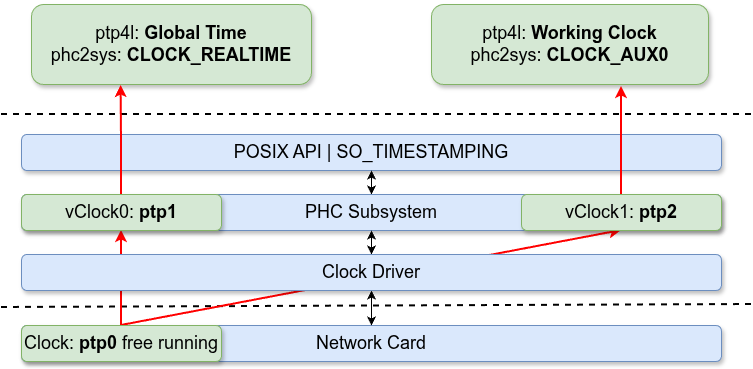
Figure 1: Linux PTP Multi Domain with virtual clocks
How do applications get access to these two PTP time domains? To have fast read access and timer support, the PHCs are typically synchronized to the Linux system time with tools such as phc2sys or chrony. Afterwards access via clock_gettime() and clock_nanosleep() is possible. The clock IDs used are CLOCK_REALTIME and CLOCK_TAI. The difference between the two is the UTC offset. However, Linux timekeeping has only one CLOCK_REALTIME/CLOCK_TAI, but there are two PTP time domains. To overcome this limitation, the auxiliary clocks can be used [2]. These new clocks are completely independent of CLOCK_REALTIME/CLOCK_TAI and can be used for arbitrary purposes. The following table shows which PTP time domain is synchronized to what Linux clock:

The RTC-Testbench contains a test case for the PTP multi-domain time sync [3]. Two industrial PCs are connected back to back. Both machines use the Intel i226 Ethernet controller. Global Time and Working Clock are instantiated. Time base for Global Time is TAI, whereas the Working Clock starts at zero. The scheduled traffic is running based on the Working Clock. The following graphs show the PTP time domain precision (master offset) and the Testbench round-trip times for the scheduled traffic using Time Aware Shaper (TAS):

Figure 2: Global Time and Working Clock master offset

Figure 3: Testbench round-trip times
Note: This Testbench test case requires clock_nanosleep() for the auxiliary clocks. This is still under development by Linutronix and not in the upstream Linux kernel yet.
Conclusion: The virtual PTP devices and the auxiliary clocks make multi-domain PTP time sync possible and let real-time applications use it. This is an important step towards adopting the IEC/IEEE TSN profile for industrial automation on Linux.
References:
[1] Y. Lu, "ptp: support virtual clocks and timestamping," Linux kernel patch series (v5), netdev mailing list, 30 June 2021. Merged in Linux 5.14. Framework commit 5d43f951b1ac ("ptp: add ptp virtual clock driver framework").
https://lore.kernel.org/netdev/20210630081202.4423-1-yangbo.lu@nxp.com/
[2] T. Gleixner and A.-M. Behnsen, "timekeeping: Provide support for auxiliary clocks," Linux kernel patch series (v2), LKML, 19 May 2025.
https://lore.kernel.org/all/20250519082042.742926976@linutronix.de/
[3] K. Kanzenbach, "working_clock_3: PTP multi-domain test case," RTC-Testbench GitHub repository, Linutronix, 18 May 2026. Commit 711ec70 ("tests: Add another working clock test case").
https://github.com/Linutronix/RTC-Testbench/tree/main/tests/working_clock_3