

by Nam Cao

RISC-V is an open-source instruction set architecture (ISA) based on Reduced Instruction Set Computing (RISC) principles. It’s modular, extensible and versatile, suitable for a wide range of applications. With standard features like integer and floating-point instruction sets, it fosters innovation and collaboration in academia, industry, and the open-source community.
Despite being a relatively new entrant, RISC-V is rapidly garnering support across the tech landscape. The first Linux-capable RISC-V CPU – Freedom U540 – was released by SiFive in 2018. Other companies quickly followed: Starfive released the JH7100 SOC in 2022, and the SG2042 processor was announced in 2023 by Sopho. RISC-V port has been added to numerous popular software projects such as Linux, QEMU, GCC, and LLVM. Linux distributions like Debian and Arch are also embarking on RISC-V support.
Linutronix keenly observed the ascent of RISC-V and recently acquired a Visionfive 2 board from Starfive [1]. In this article, they share their experiences and challenges encountered on the journey to establish a Debian system on this board.
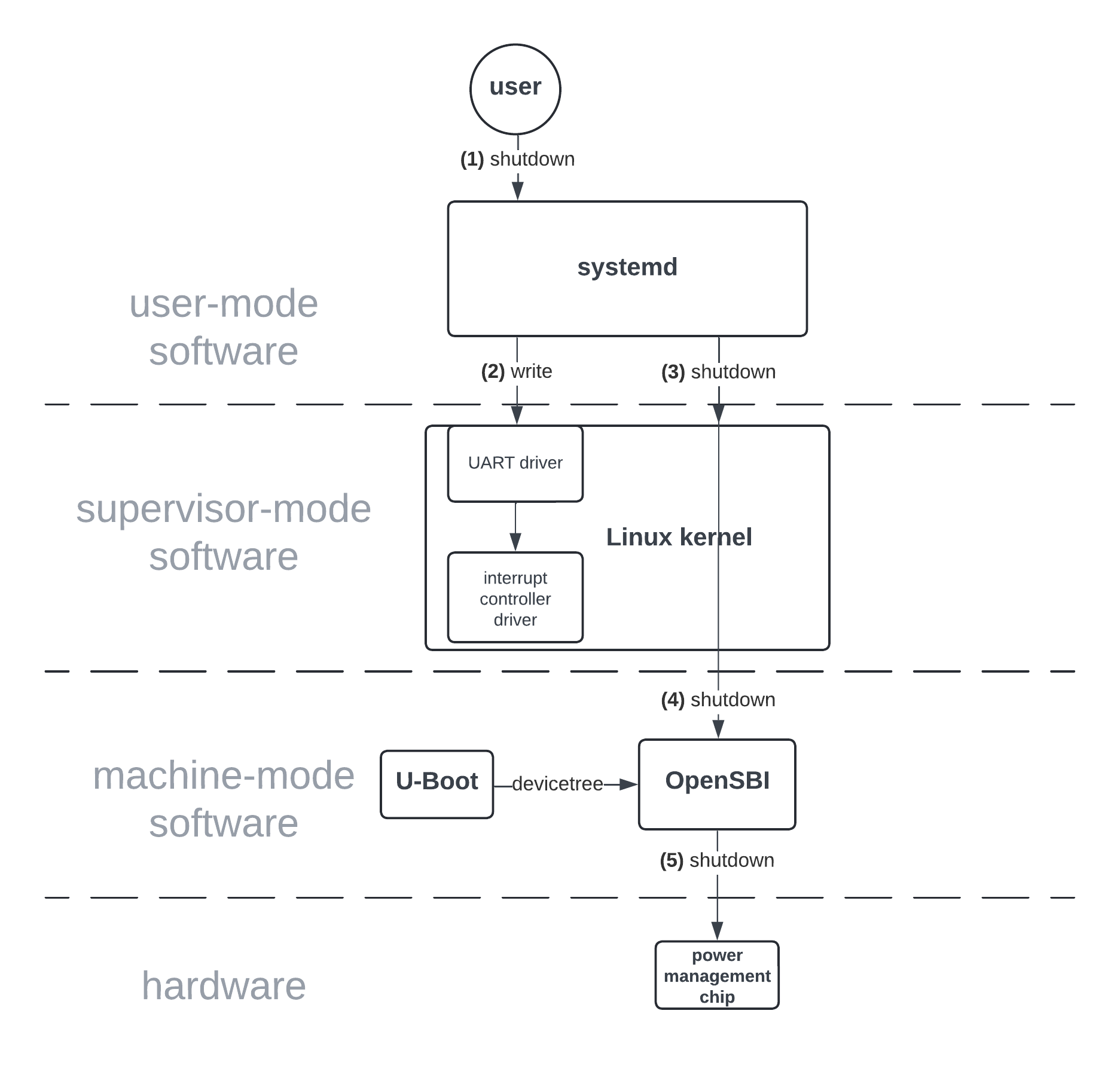 What happened really on the board when we tried to shut it down? After the “shutdown” command was started, systemd started to kill off the user processes and then got frozen. The reason for this behavior is that systemd got stuck writing its execution log into the terminal (step 2), which is backed by a UART device. So, something was wrong with that UART device. Fortunately, the SSH connection was still alive, and so it was possible to connect to the system.
Tracing the execution of the kernel’s UART driver, everything seemed normal except of the driver’s interrupt handler was somehow not being executed. Subsequently, the attention was turned to the interrupt controller.
With the Visionfive 2 board, the interrupt handling consists of 5 steps:
 Syzkaller software [23] was used to perform fuzzy testing on the kernel and noticed no problem after being in use for around 20 hours. To clarify, 20 hours is very short in the context of fuzzing, but at least it still shows us that there is no blatant problem with Preempt_RT patches on RISCV kernel.
The unexpected behaviour
The RISC-V port of the Linux kernel is relatively recent: it was integrated into the mainline Linux in 2017. As for the Visionfive 2 board, while basic support was added to Linux in 2023, additional features are currently undergoing development as of the time of writing this article. Consequently, encountering problems is anticipated. The following section describes the experience navigating the process of running a Debian system on the board.Sleeping in atomic context
On the first attempt at booting the Linux kernel, there was a warning from the kernel: “BUG: sleeping function called from invalid context at drivers/spi/spi.c:1428” What happened: a sleeping function is called inside a kernel’s tasklet, which is executed in atomic context. Is that allowed? Remember, a tasklet runs in atomic context which forbids scheduling to another thread. The root problem stems from an SPI framework feature supporting a delay between SPI transfers (useful for some devices that need time to process the messages before receiving the next one). The SPI controller in the Visionfive 2 board uses the kernel’s tasklet to transfer data. The transfer process includes the following steps:- SPI driver is requested to send an SPI message (which consists of multiple SPI transfers).
- SPI driver sets its internal pointers to the first SPI transfer and then enables an interrupt request which gets asserted as soon as the hardware’s FIFO buffer is empty.
- SPI device’s interrupt is asserted, the interrupt handler copies the SPI transfer data into the hardware buffer. If there is still some data to send but the hardware buffer is already full, the interrupt handler returns so that other threads can run. This step repeats until all data has been sent, then the SPI interrupt is disabled and a tasklet function is scheduled.
- Tasklet function finishes the SPI message if there is no more SPI transfer. Otherwise, if a transfer delay is requested, a delay function is called. The internal pointers are set to the next SPI transfer, and the SPI interrupt is enabled. Afterwords the tasklet function returns. Step 3 is resumed as soon as the SPI controller is ready.
How to shut down the board?
Now that the kernel booted without warning, the board was attempted to shut down. It turned out that this was not so easy possible. First, let’s have a look at how the shutdown process should happen. The diagram below visualizes the entire process. First, users type the command “shutdown” in the terminal (step 1), which invokes systemd. Systemd then shuts down all user processes one by one, during this time it writes to the kernel log which can be seen on the UART console if configured (step 2). When all user processes have been shut down and the filesystems have been unmounted or in a safe state, systemd makes a “shutdown” system call to Linux (step 3). Linux then does its cleanup and makes a “system shutdown” environment call to the “Supervisor Execution Environment” (SEE) as specified by RISC-V Supervisor Binary Interface (step 4) [5]. Linutronix used OpenSBI, an open source software implementation of SEE. To shut down, OpenSBI in a first step figures out which hardware is available based on the device tree (provided by U-Boot during booting, which is different from Linux kernel’s device tree) [6]. Thanks to the information provided by the device tree, OpenSBI knows that a power-management chip is present. In a next step it tells the power-management chip to shut down the board (step 5). This is specific for this setup (systemd, OpenSBI, U-Boot), but other setups should also work in a similar manner.
What happened really on the board when we tried to shut it down? After the “shutdown” command was started, systemd started to kill off the user processes and then got frozen. The reason for this behavior is that systemd got stuck writing its execution log into the terminal (step 2), which is backed by a UART device. So, something was wrong with that UART device. Fortunately, the SSH connection was still alive, and so it was possible to connect to the system.
Tracing the execution of the kernel’s UART driver, everything seemed normal except of the driver’s interrupt handler was somehow not being executed. Subsequently, the attention was turned to the interrupt controller.
With the Visionfive 2 board, the interrupt handling consists of 5 steps:
- The interrupt controller notifies the processor, triggering the execution of the interrupt handler
- Linux kernel reads the interrupt controller’s “Claim/Complete” register, getting the interrupt number. This interrupt number becomes “claimed” and will never get asserted again until it is completed (in step 5).
- Kernel acquires the lock for this interrupt number, protecting other accesses to this interrupt (for example preventing other processes from disabling this interrupt)
- UART’s interrupt handler is executed, writing data to the UART pin
- Kernel writes back the interrupt number to the “Claim/Complete” register in the interrupt controller, allowing the interrupt to be asserted again.
Additional devices and the device tree overlay feature
The next step was to plug in an LCD display screen to the board. This LCD device communicates with the processor via the SPI bus. However, unlike other buses like PCI or USB, SPI doesn’t support device enumeration. In other words, the kernel cannot detect if and which device is present; users have to tell the kernel which devices are present. The usual method for that is device tree overlay [16]. We created a new device tree file describing the LCD display. Unfortunately, the kernel reported that our new device tree conflicts with the existing base device tree. The problem was that some GPIO pins used to plug in the LCD display, were already reserved for other devices in the base device tree. To overcome this problem, the GPIO driver was modified in the way that it is possible to free up these GPIO pins [17, 18]. Now, disabling GPIO pins in the device tree overlay is possible and using those pins for the LCD display device.The framebuffer problem
After all, the kernel didn’t reject the device anymore, the kernel started up and recognized the display. However, sending an image was resulting in a black screen. Background information about how the driver for our display screen works: The framebuffer driver uses the “deferred IO” technique to optimize the performance. Therefore, the driver does not refresh the screen every time the user writes a pixel to the driver. Here, the driver collects multiple pixels written from the user into an internal buffer (in system memory) and sends later all these pixels in a single burst. The problem occurs when the user decides he is done writing the data and wants to close the device. During the close, the driver cancels the pending workqueue; thus, if the user closes the device too quickly after writing his data, the workqueue gets canceled before doing anything and the user data are not written to the screen. To fix this, the drivers closing function was modified to ensure that the workqueue finishes all its jobs before closing the device node [19, 20].Preempt_RT kernel
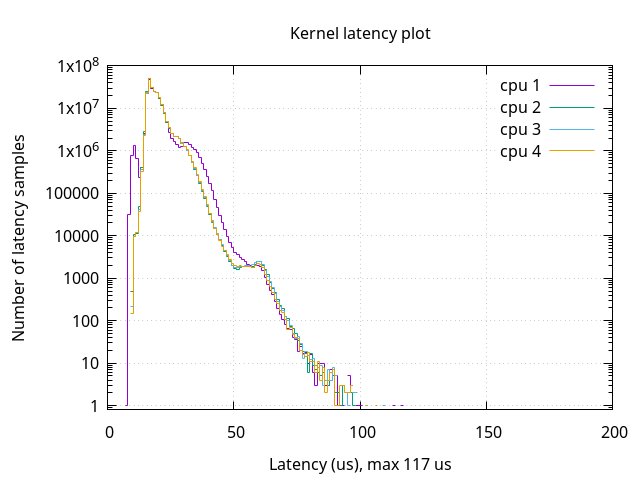
Now that the entire system ran without a hiccup, the question was how well it will perform in the real-time context. The Preempt_RT patchset was applied to the kernel, rebuilt, and booted this new kernel. Doing so we have added a preemption model which provides real-time capabilities. For the RISC-V port, the Preempt_RT patch has only been supported recently starting from v6.6-rt14 [21], and yet the entire system boots up and runs completely fine. We ran the cyclic test on the system to measure the worst-case latency of the kernel [22]. This test programs a timer to wake up at a specific point in the future and goes to sleep. The timer fires and wakes up the task. Then the test compares the current time with the time it wanted to be woken up. The difference in the wake-up latency is shown below. The worst-case latency is 117us while the average latency is 19us, which is consistent with what could await from the hardware. Limiting the maximum latency is important for some use cases, e.g. in industrial control systems or audio and video systems. For comparison, the worst-case latency for the mainline kernel is 47646us and the average latency is 19us.
Syzkaller software [23] was used to perform fuzzy testing on the kernel and noticed no problem after being in use for around 20 hours. To clarify, 20 hours is very short in the context of fuzzing, but at least it still shows us that there is no blatant problem with Preempt_RT patches on RISCV kernel.