
AI agents are the thing right now: give one a goal and it acts on its own, calling tools and writing code to get there. Almost all of that happens in software. Here is one doing what most cannot, working on real, physical hardware. An off-the-shelf agent, pointed at our test lab, can reserve a real embedded board, flash it, watch it boot on the serial console, run a test, and power-cycle it back to life when a bad flash bricks it. No human in the loop.
None of this is a demo or a diagram. It runs in our lab, on real boards, every day. The judgment behind it comes from years of embedded and Linux engineering, building and operating systems like this on real projects. That is the only reason I can hand you the short version with any confidence.
The agent is off-the-shelf. I didn't train a model or write an agent; I connected an existing one to infrastructure we already had. The agent was trivial because the lab was already right, and getting a lab right is a design problem, not a build one. This post is the skeleton we converged on. An agent driving hardware is only as good as the lab it drives.
So this isn't a post about AI agents. It's about the lab that makes one safe to run. The agent is the last mile. The lab is the road. How the agent plugs in is one small piece, and I will come back to it at the end. First, the lab.
And almost none of it is new. These problems were solved decades ago, one floor down, in the server room.
The server room already solved this
Pick any server in a datacenter. From anywhere in the world you can open its console, power-cycle it, mount install media, and check its health. That is the BMC: a small management computer on its own isolated network, independent of the main system. Around it sits 30 years of operational maturity. Separate management network, per-user accounts, schedulers that allocate machines to tenants, fleet tooling that configures hundreds of boxes at once.
Now look at an embedded test lab: a single-board computer on a desk, a serial cable, a smart plug, some shell scripts.
The needs are identical.
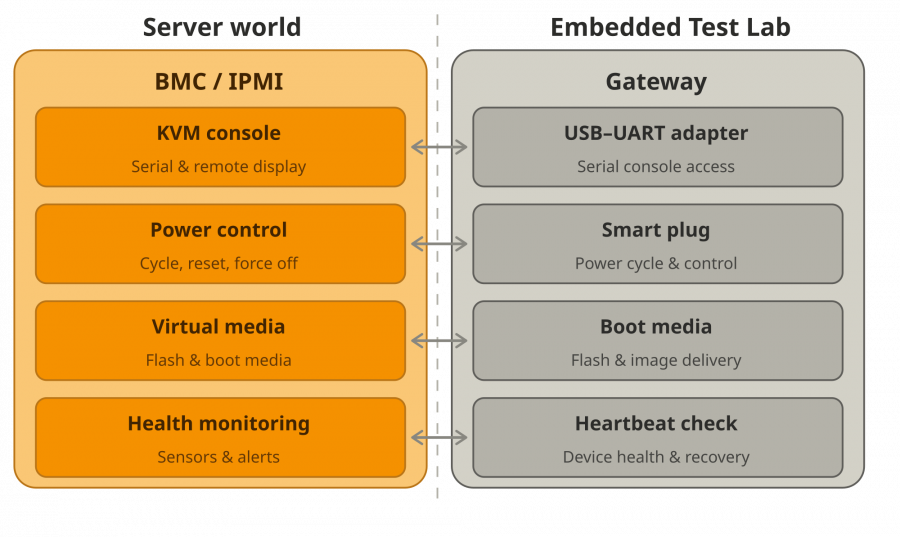
Same abstraction, different scale. A BMC is dedicated silicon on a server motherboard. A test-lab gateway is a single-board computer with USB peripherals. The architecture is identical: a dedicated management device, on an isolated network, providing console, power, boot media, and health for the device it sits next to.
“How do I remotely flash my board?” is a virtual-media question. “How do I share devices between people?” is a scheduling question. “How do I give CI access?” is an identity question. The answers exist. They just haven't been pointed at this context.
Test infrastructure is a layer, and everyone is a user of it
Test infrastructure is a layer. On top of it sit the consumers: CI executing suites, developers and testers writing test cases or doing manual bring-up, and now AI agents. These are not different problems. They are one consumer with two variables changed: the role (what this user may do, on which devices) and, when it matters, the access method (browser SSO for a person, client-credentials for a pipeline, a tool-call interface for an agent).
Everything else is the same. The operations on a device don't change because the caller is a robot. Build the layer once, for every consumer, and you never build “AI agent support” as a feature. The agent is already a user.
Every piece below serves a person and a pipeline first.
What it takes
Architecture level on purpose. These are the decisions that matter and the open-source pieces that fill each role. The hard part was never the wiring; it was knowing which of these to get right, and why.
1. The gateway: control below the OS.
The non-negotiable is this: you have to reach a board's console, power, and boot media when its OS is down, which is exactly when you are testing. There is more than one way to get there. A network-controlled power unit can cycle a board. A network serial server can put its console on the network. For a small or fixed setup, a handful of networked appliances is enough.
A dedicated gateway, a small computer next to the hardware, earns its place when you want more than reachability. It gives your test framework one standard interface for power, console, and flash instead of a different vendor protocol per peripheral. It gives you somewhere to run code, microservices sitting right next to the device. And it gives you control of the software environment: a purpose-built OS image ends the usual fight with package versions and dependency drift, because the environment is something you ship to the gateway, not something you reassemble on each one by hand. Building that image is squarely the kind of work we do.
That standard interface is also an abstraction boundary. Everything specific to a given DUT lives on the gateway in software, a microservice or a local driver talking to the hardware directly. Change the board or bump its firmware and the consumers above never see it. A test suite, or an agent, never has to care which revision of the hardware it landed on. And when it does care, the revision is just another attribute in the lab's data model, something a consumer asks for on purpose instead of discovering and special-casing at runtime.
One gateway per device is the clean default, the same fault-isolation logic that gives every server its own BMC: a dead gateway takes out one board, not twenty. But it is not a hard rule. A single gateway can drive several DUTs at once, and we have run it that way where density or cost matters more than blast radius. You trade some isolation for fewer machines to manage, and nothing else in the architecture changes.
2. Reachability: a mesh VPN
Gateways live behind home routers, office firewalls, and NAT. A WireGuard-based mesh makes location irrelevant and needs no inbound ports: self-host the control plane with NetBird or Headscale, or start in minutes with Tailscale. “Where is this board” stops being a question.
This is what makes the lab genuinely distributed. Hardware stays where it is and people reach it over the mesh, so you stop shipping boards to whoever needs them, unless the work is low-level enough to need hands on the device. A developer can share a board on their own desk with a colleague on another continent and run a debug session on it together. And the overlay heads off a whole class of connectivity problems before they hit: no port forwarding, no firewall tickets, no address coordination.
The transport is a choice, not a fixture. WireGuard over the internet is the easy default, but the same overlay model does not require the public internet at all. For teams that cannot put R&D hardware online, defense and sensitive IP being the obvious cases, the reachability layer can run over networks built for exactly that, like Reticulum, which moves encrypted traffic across radio, serial, and other mediums with no internet in the path. The architecture above is unchanged; only the layer carrying the packets is different.
3. Device abstraction and a registry (the labgrid model)
Nobody should hard-code “smart plug at this IP.” The pattern underneath is three layers: resources describe what hardware exists, drivers know how to operate a specific model, and protocols define the contract a consumer codes against (power: on, off, cycle; console: read, write; flash: write image). A user says “power on” and the layer resolves it to the right driver for the actual hardware. Those three layers are not something I invented; they are how labgrid, the open-source framework many embedded teams build on for exactly this, models the problem.
That indirection is the whole point. Swap a serial adapter or a power switch for a different model and not a single test changes. A registry sits on top, the same idea as service discovery in microservices: consumers ask “where is board-03” or “any board that can be flashed” and get back connection details, so you add, move, or replace a gateway without updating a single client. Skip this layer and every script is welded to specific hardware, breaking the day you change a cable.
4. Identity: certificates and roles
SSH certificates are the right primitive because SSH is already on every Linux device. Nothing extra to install on a gateway or a DUT, no new daemon to expose, no new attack surface. Certificates turn that native channel into a real PKI: a CA signs short-lived identities, devices trust the CA instead of a pile of public keys, and access expires on its own with nothing to clean up. No standing credentials, no root key in a config file, no authorized_keys to manage anywhere. The secure path is also the path of least resistance, which is the only kind of secure default that survives a busy team. Person, pipeline, or agent: each is a principal, none is an exception.
Identity decides more than who you are. Tied to roles, the same login governs what you may reach: which devices, and which lab environment. We run several environments by purpose, a CI pool, a developer playground, and others, isolated so a noisy experiment never lands on a pipeline's board. Role-based identity, Keycloak in our case, maps each person or service to the environments and devices they are allowed into, and the whole setup runs containerised, so standing up a new isolated environment is a deployment, not a rebuild. That is the difference between a lab a team can share and a lab an organization can.
5. Reservation-gated access
Sharing physical devices is a mutual-exclusion problem, except the lock is a real board and forgetting to release it blocks the whole team. Convention does not solve this. A spreadsheet or a chat message saying “I'm on board-03” holds until someone forgets to check, and then two pipelines fight over the same hardware in the middle of a test.
So enforce it where it counts. Access is gated on holding a reservation, checked at the network layer, not by asking people to behave. Hold the reservation and you are in; don't and the connection is refused before a shell starts. Reservations carry a TTL and auto-release, so a crashed pipeline or a developer who went home for the weekend frees the board on its own, the same discipline as releasing a lock in a finally block. This is also the wall that contains an agent: it reaches only what it currently holds, and it cannot hold a board forever.
6. One interface for every user
A lab with six tools, a wiki page, and tribal knowledge has a real cost: every new person spends their first week learning how to run anything, and half of what they learn is already out of date. Collapse it into one surface. A single entry point that knows what a user may do on the devices they hold and exposes only that.
A developer gets a CLI, a pipeline drives the same surface in its own flow, an agent reaches it through a small protocol it can speak. Same capabilities, same reservation rules, three access methods. Because the surface is already capability and reservation aware, it only ever offers actions you can actually take, which is exactly what makes it safe to hand to an agent without a second thought. The work that removes ramp-up friction for a human is the work that makes the surface safe for everything else.
The agent is just another user
With those six in place, adding an agent is not a project. It is a small adapter in front of the surface we already had: an MCP server, the emerging standard for letting an AI agent call external tools. That is the whole of how the agent plugs in, the one small piece I promised at the start.
The agent gets what a human gets: reserve, power, flash, console, run, release. Nothing more. Identity, reservations, and isolation still apply.
That is the scene from the top. A developer asks the agent to add a test. It reserves a board, writes the test, flashes an image, and reads the real console output as the board boots. The test fails because the kernel hung before userspace. The agent fixes the timing, reflashes, reruns. A flash goes bad and the board bricks. It cuts power, waits, powers back on, and recovers.
Notice what the agent never got: elevated privileges, a standing credential, access to anything it didn't reserve, a path around the network gate. Its blast radius is one reserved board, the same as a human, bounded the same way. That is the whole safety story, and it is structural, not a policy you hope the agent respects.
The closed loop, write a test then flash, read, fix, rerun, recover, is not an agent trick. It is the layer doing for an agent what it already does for a developer and a CI job. Get the lab right and the agent is the easy part.
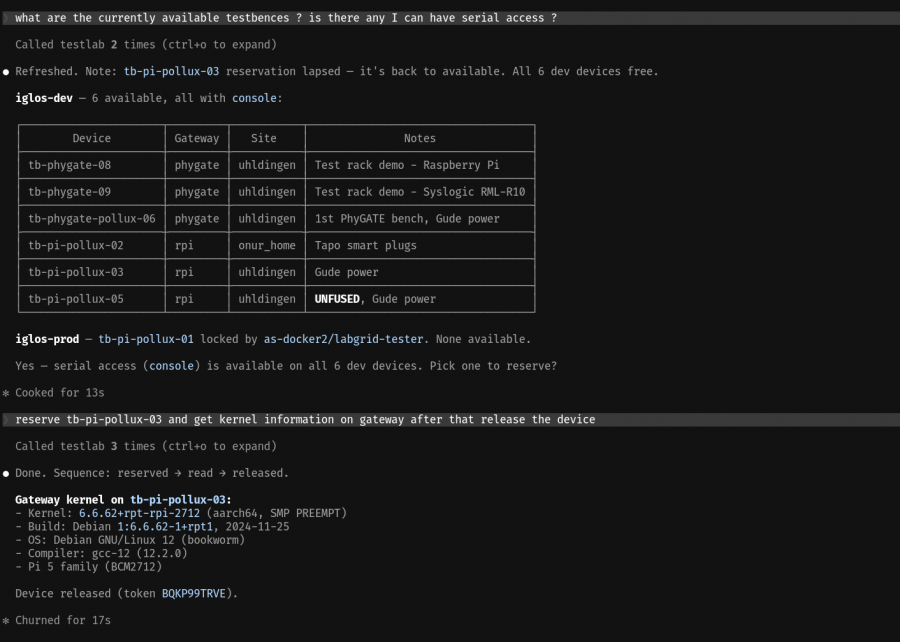
Example session
How a user experience would look like for such an infrastructure, utilizing an off-the-self AI agent:
Screenshot_20260601_170736
Where this goes
Each layer above is a post's worth of depth: the design pattern, the open-source tools, where it breaks in practice. I would rather write the ones people want.
Tell me which first: below-OS control and the gateway, mesh networking, device abstraction, identity and access, reservation-gated access, the single shared interface, or the agent layer that sits on top. Most interest gets written first. Subscribe or follow if you want to know when it lands.
And if you are building this, solid test infrastructure that humans, CI, and agents can all drive without it becoming a liability, it is one of the things we help teams with. If that is on your plate, reach out.
Appendix: tools by role
A menu, not a prescription. Every role can be filled more than one way.
- Mesh networking:WireGuard as the transport, with NetBird or Headscale to self-host the control plane, or Tailscale for a hosted start. For air-gapped work, Reticulum carries traffic with no public internet in the path.
- Device control and reservations:labgrid, which models resources, drivers, and protocols and handles device reservations through its coordinator.
- Gateway OS: a purpose-built image instead of a hand-installed one. Build a Debian base with ELBE, or go from scratch with Yocto or Buildroot.
- Configuration management:SaltStack, Ansible, or Puppet to deploy gateways and services and keep them in a known state.
- Identity and certificates: an OIDC provider such as Keycloak, Zitadel, or Dex, paired with an SSH CA such as step-ca.
- Environment isolation:Docker or Podman for containerised, per-purpose environments.
- Monitoring and observability:Prometheus for metrics, Grafana for dashboards, Loki for logs, with Grafana Alloy or Vector as the collector.
- CI/CD:GitLab CI or Jenkins driving test runs as a first-class lab consumer.
- Test authoring:Robot Framework or pytest for the suites, Selenium when a device exposes a web UI.
- Agent interface: the Model Context Protocol, the standard an off-the-shelf agent uses to call the lab.
The single shared interface, the CLI and the surface behind it, is usually something you build. That glue is the part worth getting right.